
Beyond ReAct: Why I Rebuilt My AI Trip Planner as a "Deep Agent".

A simple AI agent can plan a weekend. A family trip across three countries needs something with a plan, a team and a notebook.

Wayfinder mid-run. Seven specialists are searching at once, and the trip brief the agent settled on is on the right.
The short version
- Simple AI agents work like one person doing everything from memory: think, do one thing, look at the result, repeat. That's fine for small jobs and gets messy on big ones.
- Deep agents work like a small agency: a coordinator who writes a checklist, hands pieces to specialists who work at the same time, and keeps notes in files instead of in their head.
- I rebuilt my trip planner both ways. The deep version is structurally simpler to extend, handles multi-city trips in parallel, and can show you its progress as it goes.
- It also costs more to run and isn't always the right tool. I cover that honestly below.
The trip that broke my first agent
Here is the request I kept testing with:
"2 adults and 1 child (age 8), flying from New Delhi. Paris, Amsterdam and Rome in that order, 10 days, 4-star hotels with breakfast, high-speed trains between cities where possible, total budget ₹7,00,000. Don't ask me questions unless you're truly blocked. Just make reasonable assumptions and show me the plan."It reads like one request. It is really about a dozen jobs: an outbound flight, a return flight, a flight or train between cities, three hotel searches, sights for three cities, airport transfers, local transport, and a budget check that has to include every one of them.
My first attempt used a ReAct-style agent. I'll explain that term next, because it's the key to the whole post.
Two ways to build an AI agent
The solo travel agent (ReAct)
ReAct stands for Reason + Act. The AI runs a simple loop:
1. Think about what to do next
2. Act by using a tool (search flights, look up a hotel)
3. Look at what came back
4. Repeat until it decides it's finished
Picture a single travel agent at one desk. They search flights, then hotels, then attractions, and every result piles up on the desk. By the time they reach the budget, they're buried under paperwork, and there's no written to-do list, only their memory of what they meant to do.
That works for short jobs. On long ones you get three problems:
- The desk fills up. Every search result lands in one shared conversation, which the AI has to keep re-reading.
- The plan is invisible. "Book flights before doing local transport, and check the budget last" is a *request* in a prompt, not something anything enforces.
- One thing at a time. Searching three cities in parallel has to be built by hand.
The agency (deep agent)
A deep agent is the same thinking loop, plus four things borrowed from how real teams work:
- A to-do list. The agent writes an explicit checklist and ticks it off as steps finish.
- A team of specialists. It hands jobs to sub-agents (a flight expert, a hotel expert, and so on). Each starts with a clean desk and sees only its own task.
- A shared notebook. Specialists save their detailed findings to files and report back a short summary, so the coordinator isn't buried in raw search results.
- A clear brief. A detailed instruction set describes the workflow.
The idea in one line: stop asking one AI to hold everything in its head.

Same job, two structures. On the left, every result piles onto one desk. On the right, a coordinator delegates, specialists keep their own desks, and the bulky findings go into files.
What it looks like in the app
I wrapped the deep agent in a small web app called Wayfinder. You chat on the left. On the right is a live trip board that shows:
- The trip brief the agent settled on: dates, cities, travellers, budget
- The agent's to-do plan, with steps ticking off
- Which specialist results have landed: flights, hotels, itinerary, transport, budget
With a simple agent you wait behind a spinner and hope. With this one you can watch it work.
The agent also has memory per conversation. Say "make the Amsterdam hotel cheaper" and it re-runs only the hotel search and the budget check. It doesn't start over. It also keeps working if you close the browser tab, and you can come back and pick up the stream.

The Wayfinder home screen. The trip board on the right stays empty until the agent has something to show.

A few minutes in: the first wave of specialists is done, the plan has steps struck through, and local transport is the one still running.
A real run, by the numbers
To keep myself honest, I ran the family Europe trip end to end on the live app and watched it in LangSmith, a tool that records every step an AI agent takes. Think of it as a flight recorder for the agent.
Here is what that one run looked like:
- Time: 449 seconds, about 7.5 minutes, from prompt to finished plan
- Cost: $0.0826 in AI usage, around 755.8K tokens (LangSmith's figures)
- Team size: ten specialist runs: three flight searches (outbound, Amsterdam to Rome, return), four hotel searches (one per city, plus one more launched late in the run), one itinerary, one local transport and one budget check
- Result: a plan costing about ₹6.04 lakh against the ₹7 lakh budget, including a 12% buffer marked as an estimate
That's under nine US cents for a plan that needed ten separate searches. This is one run, not a benchmark. I don't have the same measurement for the ReAct version on this exact prompt, so treat it as a data point rather than a comparison.
The recording also shows the shape of the work, which is the whole point of the deep-agent design:

The trace opens with the coordinator (running on gpt-5-mini) writing its to-do list, then saving the trip brief. Only after that does it hand anything to a specialist.

The waterfall view lays every step out along a timeline.

Two specialist tasks start side by side rather than one after the other. That overlap is why the run takes minutes and not much longer.
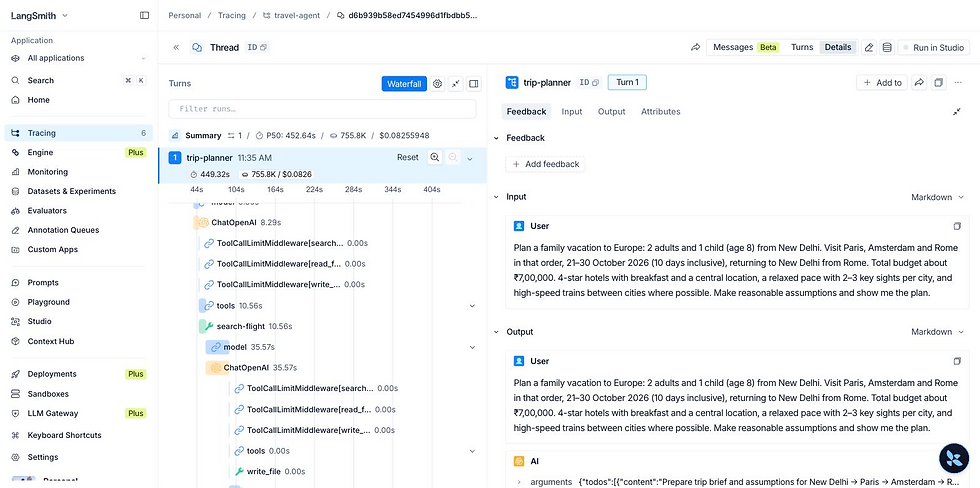
Inside one flight agent: it runs `search-flight`, then saves its findings to a file. That's the "notebook" behaviour from the analogy above.
Under the hood: ReAct vs. deep, change by change
My baseline wasn't a strawman. It was a 'create_agent' coordinator with five specialist sub-agents (flights, hotels, itinerary, local transport, budget), each wrapped as a tool. Same tools in both versions: Kiwi flights and Trivago hotels over MCP, plus web search. Here is what changed when I moved to the `deepagents` library.
Sub-agents became data, not plumbing
Before, each specialist needed a hand-written wrapper tool. It pulled fields from state, checked that they existed, invoked the sub-agent, and pushed the result back. Five specialists meant five wrappers.
Now a specialist is a plain dictionary:
hotel_agent = {
    "name": "hotel-agent",
    "description": "Finds the best hotels for ONE city, dates and guest count.",
    "system_prompt": HOTEL_PROMPT,
    "tools": mcp_tools,
    "model": "openai:gpt-5-nano",
}

agent = create_deep_agent(
    model="openai:gpt-5-mini",
    system_prompt=COORDINATOR_PROMPT,
    subagents=[flight_agent, hotel_agent, itinerary_agent,
               transport_agent, budget_agent],
    state_schema=TripState,
    checkpointer=checkpointer,
)
The coordinator reads each 'description' and delegates through the built-in 'task' tool. The wrapper code disappeared.
2. Fan-out came for free
My old 'search_hotels' tool was one fixed function. With 'task', the coordinator can launch the same specialist several times in one turn: a flight-agent for the outbound leg, one for the return, one per intra-Europe leg that needs a plane, and a hotel-agent per city. They run in parallel. The prompt just says so:
"In ONE turn launch in parallel: a flight-agent for the international OUTBOUND, a flight-agent for the international RETURN... a hotel-agent per city, and an itinerary-agent."3. The plan became a real object
'write_todos' gives the agent an explicit checklist in state. In my case it's opt-in, added with 'TodoListMiddleware'. The web app streams that list to the trip board.
4. Context stayed small
Each specialist ends with the same rule:
"Write your full findings to the file {path}. Reply with a summary of at most 6 lines that includes the total cost of your best option."The coordinator's context holds summaries. The budget agent lists '/trip/' and reads the files itself, so its sums come from the files rather than a retelling.
5. Guards moved into middleware
The old "missing field" checks became a 'TripStateMiddleware' that wraps the 'task' tool. Before a specialist runs, it checks the prerequisites. After it returns, it writes the result into a typed state field. Reducers ('Annotated[str, _append]') handle several specialists of the same kind finishing in the same step, for example one hotel-agent per city.
Can you trust the plan? Grounding
Travel is a domain where a confident hallucination costs real money. A flight number that doesn't exist is worse than no flight number.
So Wayfinder treats the AI's plan as a claim to verify, not a fact to display:
- Every real flight and hotel result the search tools return is recorded as evidence.
- Before the plan is finalized, the AI has to "check out" its picks. Anything the searches never returned, or with a price that doesn't match, is rejected. The AI gets the real options back so it can correct itself.
- Accepted picks appear as "✓ Verified" cards built from the search data (airline, times, baggage, booking link), not from the AI's wording.
- The final written answer is scanned for flight numbers or links that no search returned, and any it finds show as warnings.
- Where the data source is silent, the app says so. The hotel search doesn't report breakfast or room type, so the app shows "not confirmed by source" instead of letting the AI guess.
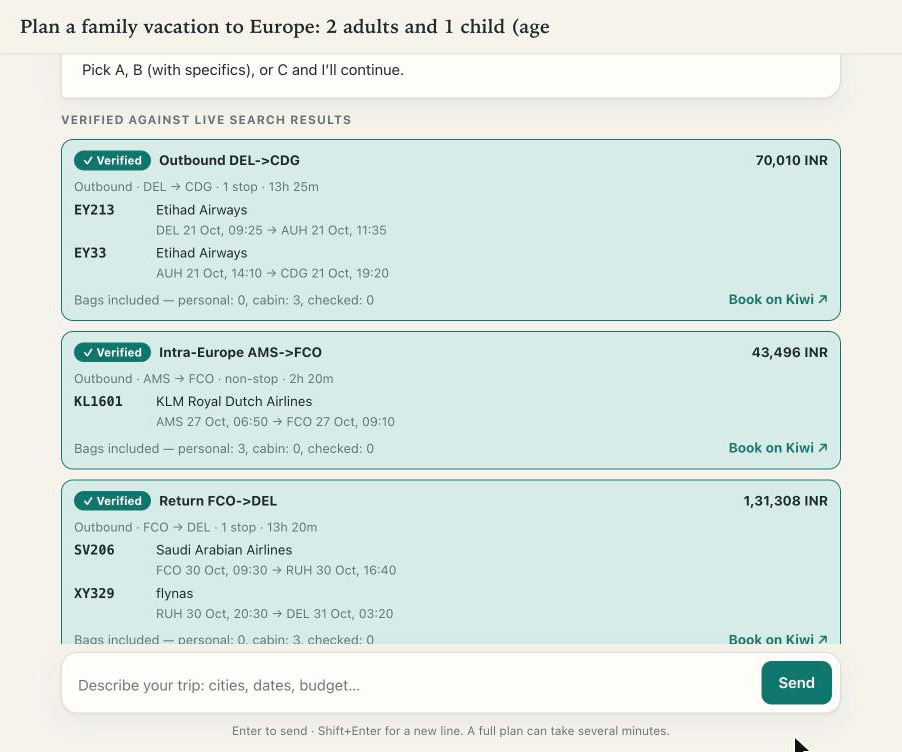
"✓ Verified" flight cards, built from the search results rather than the AI's wording: airline, flight number and local time of every segment, baggage, and a booking link.

Verified hotel cards. Note "Breakfast: not confirmed by source": the hotel search doesn't report it, so the app says so rather than guessing.
**Under the hood:** the evidence store is an MCP tool interceptor that records raw Kiwi and Trivago results per conversation. The gate is a tool called `record_selections`, and the budget step is refused until it succeeds. This isn't unique to deep agents, and you could bolt it onto a ReAct agent. But the deep harness made it natural: the gate is just another tool, and the typed state carries the verified results.
The honest part: what deep agents did not fix
Prompts still matter. In my first version's test run, the agent stopped to ask clarifying questions and needed three turns to produce a plan, even though I'd said "only check in if truly blocked." Part of that was my old prompt ("ask the user directly for anything missing"). The deep version's prompt says "make reasonable assumptions and list them." That's a prompt change, and it would have helped the ReAct version too.
Which one should you use?
Choose a simple (ReAct) agent when the job is short: answer a question, run one search, fill in one form. It's faster, cheaper and easier to debug.
Choose a deep agent when the job is:
- long, with many steps
- decomposable, with parts that can run at the same time
- full of results too bulky to keep in one conversation
A multi-city trip is all three.
Takeaways
If you're building agents:
1. A deep agent is a loop plus structure: a plan, isolated sub-agents and files.
2. Isolation beats a bigger context window. Give each specialist a clean slate and make it return summaries.
3. Parallelism is the practical win. One specialist per city or leg is a one-line prompt instruction.
4. Verify the model's output against tool evidence before showing it.
If you're deciding whether to use one:
1. Match the tool to the job. Big, multi-part tasks benefit; small ones don't.
2. Expect higher cost and more moving parts in exchange for reliability and visibility.
3. Ask for a way to see the plan and check the sources, not just a confident answer.
For more info reach me on my email:niksv@asknikhil.com


Comments